20 Recursion
A child couldn't sleep, so her mother told her a story about a little frog,
  who couldn't sleep, so the frog's mother told her a story about a little bear,
    who couldn't sleep, so the bear's mother told her a story about a little weasel...
      who fell asleep.
    ...and the little bear fell asleep;
  ...and the little frog fell asleep;
...and the child fell asleep.
(Source: http://everything2.com/title/recursion)
Recursion is an object or process that is defined in terms of itself. Mathematical patterns such as factorials and the Fibonacci series are recursive. Documents that can contain other documents, which themselves can contain other documents, are recursive. Fractal images, and even certain biological processes are recursive in how they work.
20.1 Where is Recursion Used?
Documents, such as web pages, are naturally recursive. For example, Figure 20.1 shows a simple web document.

Figure 20.1: Web page
That web document can be contained in a “box,” which can help layout the page as shown in Figure 20.2.
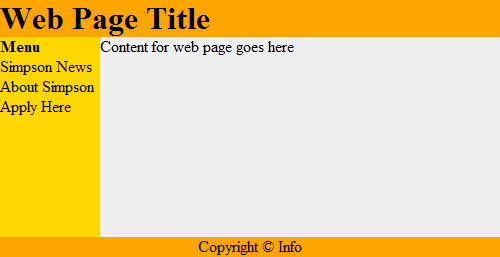
Figure 20.2: Web page with tables
This works recursively. Each box can contain a web page, that can have a box, which could contain another web page as shown in Figure 20.3.
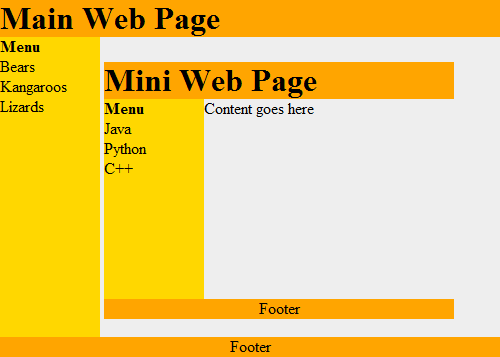
Figure 20.3: Web page with recursion
Recursive functions are often used with advanced searching and sorting algorithms. We’ll show some of that here and if you take a “data structures” class you will see a lot more of it.
Even if a person does not become a programmer, understanding the concept of recursive systems is important. If there is a business need for recursive table structures, documents, or something else, it is important to know how to specify this to the programmer up front.
For example, a person might specify that a web program for recipes needs the ability to support ingredients and directions. A person familiar with recursion might state that each ingredient could itself be a recipes with other ingredients (that could be recipes.) The second system is considerably more powerful.
20.2 How is Recursion Coded?
In prior chapters, we have used functions that call other functions. For example:
1 2 3 4 5 6 7 8 | def f():
g()
print("f")
def g():
print("g")
f()
|
It is also possible for a function to call itself. A function that calls itself is using a concept called recursion. For example:
1 2 3 4 5 | def f():
print("Hello")
f()
f()
|
The example above will print Hello and then call the f() function
again. Which will cause another Hello to be printed out and another call
to the f() function. This will continue until the computer runs out
of something called stack space. When this happens, Python will output a
long error that ends with:
RuntimeError: maximum recursion depth exceeded
The computer is telling you, the programmer, that you have gone too far down the rabbit hole.
20.3 Controlling Recursion Depth
To successfully use recursion, there needs to be a way to prevent the function from endlessly calling itself over and over again. The example below counts how many times it has been called, and uses an if statement to exit once the function has called itself ten times.
1 2 3 4 5 6 7 8 9 10 11 | def f(level):
# Print the level we are at
print("Recursion call, level",level)
# If we haven't reached level ten...
if level < 10:
# Call this function again
# and add one to the level
f(level+1)
# Start the recursive calls at level 1
f(1)
|
1 2 3 4 5 6 7 8 9 10 | Recursion call, level 1
Recursion call, level 2
Recursion call, level 3
Recursion call, level 4
Recursion call, level 5
Recursion call, level 6
Recursion call, level 7
Recursion call, level 8
Recursion call, level 9
Recursion call, level 10
|
20.4 Recursion Factorial Calculation
Any code that can be done recursively can be done without using recursion. Some programmers feel that the recursive code is easier to understand.
Calculating the factorial of a number is a classic example of using recursion. Factorials are useful in probability and statistics. For example:
Recursively, this can be described as:
Below are two example functions that calculate . The first one is non-recursive, the second is recursive.
1 2 3 4 5 6 7 | # This program calculates a factorial
# WITHOUT using recursion
def factorial_nonrecursive(n):
answer = 1
for i in range(2, n + 1):
answer = answer * i
return answer
|
1 2 3 4 5 6 7 | # This program calculates a factorial
# WITH recursion
def factorial_recursive(n):
if n == 1:
return 1
elif n > 1:
return n * factorial_recursive(n - 1)
|
The functions do nothing by themselves. Below is an example where we put it all together. This example also adds some print statements inside the function so we can see what is happening.
1 2 3 4 5 6 7 8 9 10 11 12 13 14 15 16 17 18 19 20 21 22 23 24 25 26 27 28 29 30 31 32 | # This program calculates a factorial
# WITHOUT using recursion
def factorial_nonrecursive(n):
answer = 1
for i in range(2, n + 1):
print(i, "*", answer, "=", i * answer)
answer = answer * i
return answer
print("I can calculate a factorial!")
user_input = input("Enter a number:")
n = int(user_input)
answer = factorial_nonrecursive(n)
print(answer)
# This program calculates a factorial
# WITH recursion
def factorial_recursive(n):
if n == 1:
return 1
else:
x = factorial_recursive(n - 1)
print( n, "*", x, "=", n * x )
return n * x
print("I can calculate a factorial!")
user_input = input("Enter a number:")
n = int(user_input)
answer = factorial_recursive(n)
print(answer)
|
1 2 3 4 5 6 7 8 9 10 11 12 13 14 15 16 17 18 | I can calculate a factorial!
Enter a number:7
2 * 1 = 2
3 * 2 = 6
4 * 6 = 24
5 * 24 = 120
6 * 120 = 720
7 * 720 = 5040
5040
I can calculate a factorial!
Enter a number:7
2 * 1 = 2
3 * 2 = 6
4 * 6 = 24
5 * 24 = 120
6 * 120 = 720
7 * 720 = 5040
5040
|
20.5 Recursive Rectangles
Recursion is great to work with structured documents that are themselves recursive. For example, a web document can have a table divided into rows and columns to help with layout. One row might be the header, another row the main body, and finally the footer. Inside a table cell, might be another table. And inside of that can exist yet another table.
Another example is e-mail. It is possible to attach another person’s e-mail to a your own e-mail. But that e-mail could have another e-mail attached to it, and so on.
Can we visually see recursion in action in one of our Pygame programs? Yes! Figure 19.4 shows an example program that draws a rectangle, and recursively keeps drawing rectangles inside of it. Each rectangle is 20% smaller than the parent rectangle. Look at the code. Pay close attention to the recursive call in the recursive_draw function.
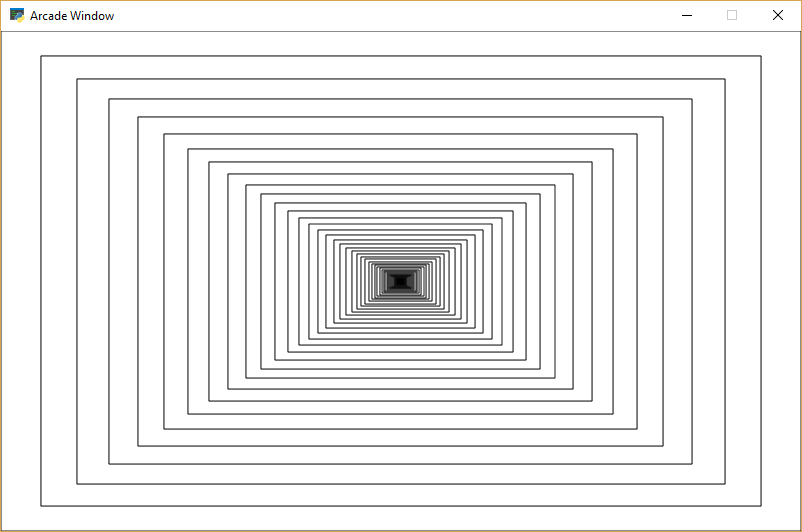
Figure 20.4: Recursive Rectangles
1 2 3 4 5 6 7 8 9 10 11 12 13 14 15 16 17 18 19 20 21 22 23 24 25 26 27 28 29 30 31 32 33 34 35 36 37 38 39 40 41 42 43 44 | """
Recursive Rectangles
"""
import arcade
SCREEN_WIDTH = 800
SCREEN_HEIGHT = 500
def draw_rectangle(x, y, width, height):
""" Recursively draw a rectangle, each one a percentage smaller """
# Draw it
arcade.draw_rectangle_outline(x, y, width, height, arcade.color.BLACK)
# As long as we have a width bigger than 1, recursively call this function with a smaller rectangle
if width > 1:
# Draw the rectangle 90% of our current size
draw_rectangle(x, y, width * .9, height * .9)
class MyApplication(arcade.Window):
""" Main application class. """
def __init__(self, width, height):
super().__init__(width, height)
arcade.set_background_color(arcade.color.WHITE)
def on_draw(self):
""" Render the screen. """
arcade.start_render()
# Find the center of our screen
center_x = SCREEN_WIDTH / 2
center_y = SCREEN_HEIGHT / 2
# Start our recursive calls
draw_rectangle(center_x, center_y, SCREEN_WIDTH, SCREEN_HEIGHT)
window = MyApplication(SCREEN_WIDTH, SCREEN_HEIGHT)
arcade.run()
|
20.6 Fractals
Fractals are defined recursively. Here is a very simple fractal, showing how it changes depending on how “deep” the recursion goes.
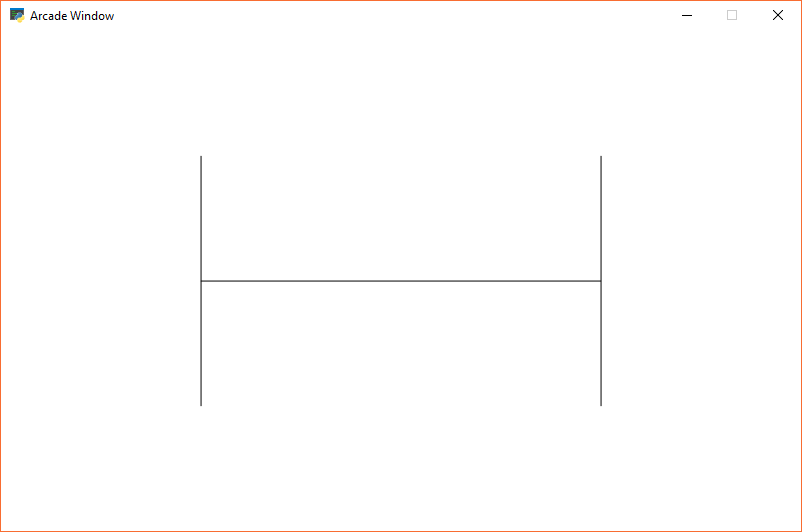
Figure 20.5: Recursive Fractal Level 0
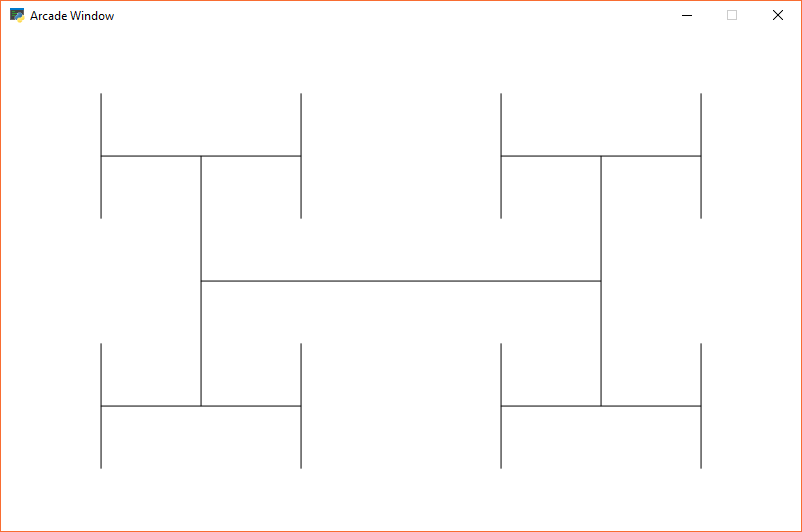
Figure 20.6: Recursive Fractal Level 1
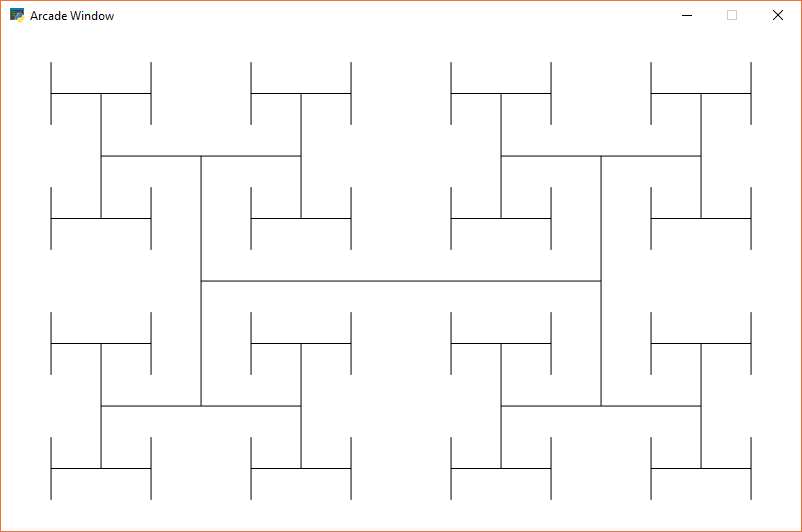
Figure 20.7: Recursive Fractal Level 2
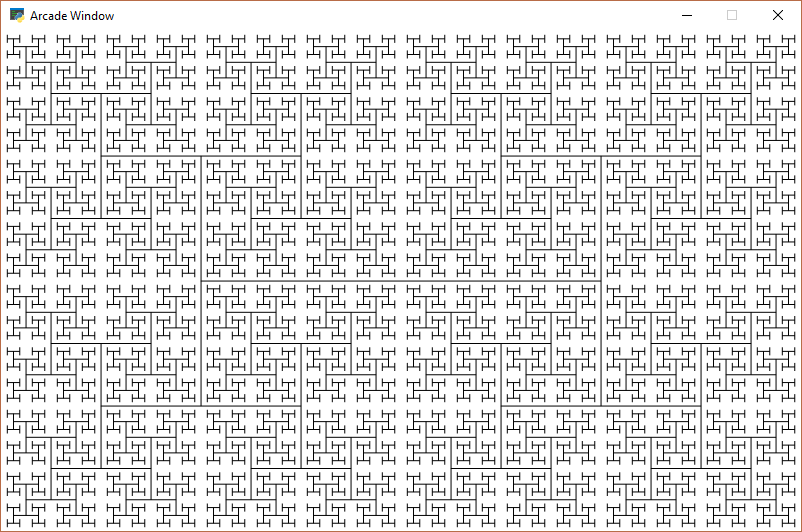
Figure 20.8: Recursive Fractal Level 5
Here is the source code for the “H” fractal:
1 2 3 4 5 6 7 8 9 10 11 12 13 14 15 16 17 18 19 20 21 22 23 24 25 26 27 28 29 30 31 32 33 34 35 36 37 38 39 40 41 42 43 44 45 46 47 48 49 50 51 52 53 54 55 56 | """
Recursive H's
"""
import arcade
SCREEN_WIDTH = 800
SCREEN_HEIGHT = 500
def draw_h(x, y, width, height, count):
""" Recursively draw an H, each one a half as big """
# Draw the H
# Draw cross-bar
arcade.draw_line(x + width * .25, height / 2 + y,
x + width * .75, height / 2 + y, arcade.color.BLACK)
# Draw left side
arcade.draw_line(x + width * .25, height * .5 / 2 + y,
x + width * .25, height * 1.5 / 2 + y, arcade.color.BLACK)
# Draw right side
arcade.draw_line(x + width * .75, height * .5 / 2 + y,
x + width * .75, height * 1.5 / 2 + y, arcade.color.BLACK)
# As long as we have a width bigger than 1, recursively call this function with a smaller rectangle
if count > 0:
count -= 1
# Draw the rectangle 90% of our current size
# Draw lower left
draw_h(x, y, width / 2, height / 2, count)
# Draw lower right
draw_h(x + width / 2, y, width / 2, height / 2, count)
# Draw upper left
draw_h(x, y + height / 2, width / 2, height / 2, count)
# Draw upper right
draw_h(x + width / 2, y + height / 2, width / 2, height / 2, count)
class MyApplication(arcade.Window):
""" Main application class. """
def __init__(self, width, height):
super().__init__(width, height)
arcade.set_background_color(arcade.color.WHITE)
def on_draw(self):
""" Render the screen. """
arcade.start_render()
# Start our recursive calls
draw_h(0, 0, SCREEN_WIDTH, SCREEN_HEIGHT, 1)
window = MyApplication(SCREEN_WIDTH, SCREEN_HEIGHT)
arcade.run()
|
You can explore fractals on-line:
- https://www.chromeexperiments.com/fractal
- http://usefuljs.net/fractals/
- http://hirnsohle.de/test/fractalLab/
If you want to program your own fractals, you can get ideas of easy fractals by looking at Chapter 8 of The Nature of Code by Daniel Shiffman.
20.7 Recursive Binary Search
Recursion can be also be used to perform a binary search. Here is a non-recursive binary search from Chapter 15:
1 2 3 4 5 6 7 8 9 10 11 12 13 14 15 16 17 18 19 | def binary_search_nonrecursive(search_list, key):
lower_bound = 0
upper_bound = len(search_list) - 1
found = False
while lower_bound < upper_bound and found == False:
middle_pos = (lower_bound + upper_bound) // 2
if search_list[middle_pos] < key:
lower_bound = middle_pos + 1
elif search_list[middle_pos] > key:
upper_bound = middle_pos
else:
found = True
if found:
print( "The name is at position",middle_pos)
else:
print( "The name was not in the list." )
binary_search_nonrecursive(name_list,"Morgiana the Shrew")
|
This same binary search written in a recursive manner:
1 2 3 4 5 6 7 8 9 10 11 12 13 14 15 16 17 18 19 20 21 | def binary_search_recursive(search_list, key, lower_bound, upper_bound):
middle_pos = (lower_bound + upper_bound) // 2
if search_list[middle_pos] < key:
binary_search_recursive(search_list,
key,
middle_pos + 1,
upper_bound)
elif search_list[middle_pos] > key:
binary_search_recursive(search_list,
key,
lower_bound,
middle_pos )
else:
print("Found at position", middle_pos)
lower_bound = 0
upper_bound = len(name_list) - 1
binary_search_recursive(name_list,
"Morgiana the Shrew",
lower_bound,
upper_bound)
|