8 Introduction to Classes
Classes and objects are very powerful programming tools. They make programming easier. In fact, you are already familiar with the concept of classes and objects. A class is a “classification” of an object. Like “person” or “image.” An object is a particular instance of a class. Like “Mary” is an instance of “Person.”
Objects have attributes, such as a person’s name, height, and age. Objects also have methods. Methods define what an object can do, like run, jump, or sit.
8.1 Why Learn About Classes?
Each character in an adventure game needs data: a name, location, strength, are they raising their arm, what direction they are headed, etc. Plus those characters do things. They run, jump, hit, and talk.
Without classes, our Python code to store this data might look like:
1 2 3 4 | name = "Link"
sex = "Male"
max_hit_points = 50
current_hit_points = 50
|
In order to do anything with this character, we’ll need to pass that data to a function:
1 2 | def display_character(name, sex, max_hit_points, current_hit_points):
print(name, sex, max_hit_points, current_hit_points)
|
Now imagine creating a program that has a set of variables like that for each character, monster, and item in our game. Then we need to create functions that work with those items. We’ve now waded into a quagmire of data. All of a sudden this doesn’t sound like fun at all.
But wait, it gets worse! As our game expands, we may need to add new fields to
describe our character. In this case we’ve added max_speed:
1 2 3 4 5 6 7 8 | name = "Link"
sex = "Male"
max_hit_points = 50
current_hit_points = 50
max_speed = 10
def display_character(name, sex, max_hit_points, current_hit_points, max_speed):
print(name, sex, max_hit_points, current_hit_points)
|
In example above, there is only one function. But in a large video game, we
might have hundreds of functions that deal with the main character. Adding a
new field to help describe what a character has and can do would require us to
go through each one of those functions and add it to the parameter list. That
would be a lot of work. And perhaps we need to add max_speed to different
types of characters like monsters. There needs to be a better way. Somehow our
program needs to package up those data fields so they can be managed easily.
8.2 Defining and Creating Simple Classes
A better way to manage multiple data attributes is to define a structure that has all of the information. Then we can give that “grouping” of information a name, like Character or Address. This can be easily done in Python and any other modern language by using a class.
For example, we can define a class representing a character in a game:
1 2 3 4 5 6 7 8 9 10 | class Character():
""" This is a class that represents the main character in a game. """
def __init__(self):
""" This is a method that sets up the variables in the object. """
self.name = "Link"
self.sex = "Male"
self.max_hit_points = 50
self.current_hit_points = 50
self.max_speed = 10
self.armor_amount = 8
|
Here’s another example, we define a class to hold all the fields for an address:
1 2 3 4 5 6 7 8 9 10 | class Address():
""" Hold all the fields for a mailing address. """
def __init__(self):
""" Set up the address fields. """
self.name = ""
self.line1 = ""
self.line2 = ""
self.city = ""
self.state = ""
self.zip = ""
|
In the code above, Address is the class name. The variables in the class,
such as name and city, are called attributes or fields.
(Note the similarities and differences between declaring a class and declaring
a function.)
Unlike functions and variables, class names should begin with an upper case letter. While it is possible to begin a class with a lower case letter, it is not considered good practice.
The def __init__(self): in a special function called a constructor that is
run automatically when the class is created. We’ll discuss the constructor more
in a bit.
The self. is kind of like the pronoun my. When inside the class
Address we are talking about my name, my city, etc. We don’t want to
use self. outside of the class definition for Address, to refer to an
Address field. Why? Because just like the pronoun “my,” it means someone
totally different when said by a different person!
To better visualize classes and how they relate, programmers often make diagrams. A diagram for the Address class would look like the figure below. See how the class name is on top with the name of each attribute listed below. To the right of each attribute is the data type, such as string or integer.
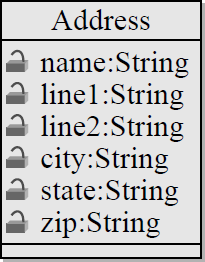
Class Diagram
The class code defines a class but it does not actually create an instance of one. The code told the computer what fields an address has and what the initial default values will be. We don’t actually have an address yet though. We can define a class without creating one just like we can define a function without calling it. To create a class and set the fields, look at the example below:
1 2 3 4 5 6 7 8 9 10 | # Create an address
home_address = Address()
# Set the fields in the address
home_address.name = "John Smith"
home_address.line1 = "701 N. C Street"
home_address.line2 = "Carver Science Building"
home_address.city = "Indianola"
home_address.state = "IA"
home_address.zip = "50125"
|
An instance of the address class is created in line 2. Note how the class
Address name is used, followed by parentheses. The variable name can be
anything that follows normal naming rules.
To set the fields in the class, a program must use the dot operator. This
operator is the period that is between the home_address and the field name.
See how lines 5-10 use the dot operator to set each field value.
A very common mistake when working with classes is to forget to specify which instance of the class you want to work with. If only one address is created, it is natural to assume the computer will know to use that address you are talking about. This is not the case however. See the example below:
1 2 3 4 5 6 7 8 9 10 11 12 13 14 15 16 17 18 19 20 | class Address():
def __init__(self):
self.name = ""
self.line1 = ""
self.line2 = ""
self.city = ""
self.state = ""
self.zip = ""
# Create an address
my_address = Address()
# Alert! This does not set the address's name!
name = "Dr. Craven"
# This doesn't set the name for the address either
Address.name = "Dr. Craven"
# This does work:
my_address.name = "Dr. Craven"
|
A second address can be created and fields from both instances may be used. See the example below:
1 2 3 4 5 6 7 8 9 10 11 12 13 14 15 16 17 18 19 20 21 22 23 24 25 26 27 28 29 30 31 32 33 | class Address():
def __init__(self):
self.name = ""
self.line1 = ""
self.line2 = ""
self.city = ""
self.state = ""
self.zip = ""
# Create an address
home_address = Address()

# Set the fields in the address
home_address.name = "John Smith"
home_address.line1 = "701 N. C Street"
home_address.line2 = "Carver Science Building"
home_address.city = "Indianola"
home_address.state = "IA"
home_address.zip = "50125"
# Create another address
vacation_home_address = Address()
# Set the fields in the address
vacation_home_address.name = "John Smith"
vacation_home_address.line1 = "1122 Main Street"
vacation_home_address.line2 = ""
vacation_home_address.city = "Panama City Beach"
vacation_home_address.state = "FL"
vacation_home_address.zip = "32407"
print("The client's main home is in " + home_address.city)
print("His vacation home is in " + vacation_home_address.city)
|
Line 11 creates the first instance of Address; line 22 creates the second
instance. The variable home_address points to the first instance and
vacation_home_address points to the second.
Lines 25-30 set the fields in this new class instance. Line 32 prints the city
for the home address, because home_address appears before the dot operator.
Line 33 prints the vacation address because vacation_home_address appears
before the dot operator.
In the example Address is called the class because it defines a new
classification for a data object. The variables home_address and
vacation_home_address refer to objects because they refer to actual
instances of the class Address. A simple definition of an object is that it
is an instance of a class. Like “Bob” and “Nancy” are instances of a Human
class.
By using www.pythontutor.com we can visualize the execution of the code
(see below). There are three variables in play. One points to the class
definition of Address. The other two variables point to the different
address objects and their data.
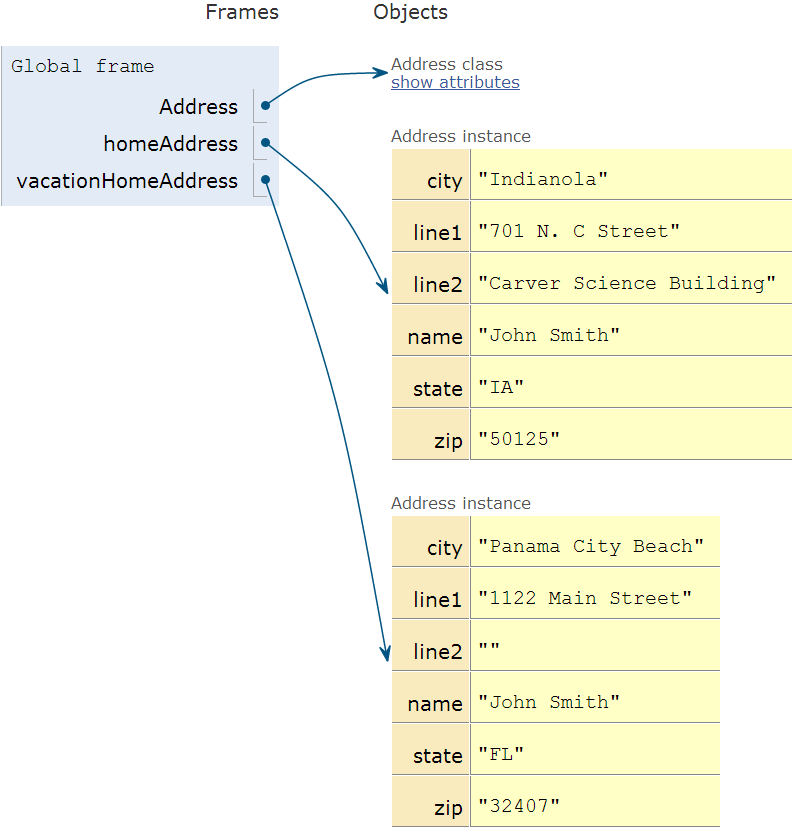
Two Addresses
Putting lots of data fields into a class makes it easy to pass data in and out of a function. In the code below, the function takes in an address as a parameter and prints it out on the screen. It is not necessary to pass parameters for each field of the address.
1 2 3 4 5 6 7 8 9 10 11 12 13 14 | # Print an address to the screen
def print_address(address):
print(address.name)
# If there is a line1 in the address, print it
if len(address.line1) > 0:
print(address.line1)
# If there is a line2 in the address, print it
if len(address.line2) > 0:
print( address.line2 )
print(address.city + ", " + address.state + " " + address.zip)
print_address(home_address)
print()
print_address(vacation_home_address)
|
8.3 Adding Methods to Classes
In addition to attributes, classes may have methods. A method is a function
that exists inside of a class. Expanding the earlier example of a Dog class
from the review problem 1 above, the code below adds a method for a dog barking.
1 2 3 4 5 6 7 8 | class Dog():
def __init__(self):
self.age = 0
self.name = ""
self.weight = 0
def bark(self):
print("Woof")
|
The method definition is contained in lines 7-8 above. Method definitions in a
class look almost exactly like function definitions. The big difference is the
addition of a parameter self on line 7. The first parameter of any method
in a class must be self. This parameter is required even if the function
does not use it.
Here are the important items to keep in mind when creating methods for classes:
- Attributes should be listed first, methods after.
- The first parameter of any method must be self.
- Method definitions are indented exactly one tab stop.
Methods may be called in a manner similar to referencing attributes from an object. See the example code below.
1 2 3 4 5 6 7 | my_dog = Dog()
my_dog.name = "Spot"
my_dog.weight = 20
my_dog.age = 3
my_dog.bark()
|
Line 1 creates the dog. Lines 3-5 set the attributes of the object. Line 7
calls the bark function. Note that even through the bark function has
one parameter, self, the call does not pass in anything. This is because
the first parameter is assumed to be a reference to the dog object itself.
Behind the scenes, Python makes a call that looks like:
# Example, not actually legal
Dog.bark(my_dog)
If the bark function needs to make reference to any of the attributes,
then it does so using the self reference variable. For example, we can
change the Dog class so that when the dog barks, it also prints out the
dog’s name. In the code below, the name attribute is accessed using a dot
operator and the self reference.
def bark(self):
print("Woof says", self.name)
Attributes are adjectives, and methods are verbs. The drawing for the class would look like Figure 12.3.
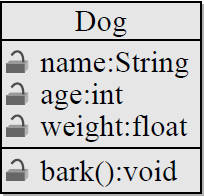
Dog Class
8.3.1 Example: Ball Class
This example code could be used in Python/Arcade to draw a ball. Having all
the parameters contained in a class makes data management easier. The diagram
for the Ball class is shown in the figure below.

Ball Class
1 2 3 4 5 6 7 8 9 10 11 12 13 14 15 16 17 18 19 20 21 22 23 24 | class Ball():
def __init__(self):
# --- Class Attributes ---
# Ball position
self.x = 0
self.y = 0
# Ball's vector
self.change_x = 0
self.change_y = 0
# Ball size
self.size = 10
# Ball color
self.color = [255,255,255]
# --- Class Methods ---
def move(self):
self.x += self.change_x
self.y += self.change_y
def draw(self, screen):
arcade.draw_circle_filled(self.x, self.y, self.size, self.color )
|
Below is the code that would go ahead of the main program loop to create a ball and set its attributes:
1 2 3 4 5 6 | the_ball = Ball()
the_ball.x = 100
the_ball.y = 100
the_ball.change_x = 2
the_ball.change_y = 1
the_ball.color = [255, 0, 0]
|
This code would go inside the main loop to move and draw the ball:
1 2 | the_ball.move()
the_ball.draw(screen)
|
8.4 References
Here’s where we separate the true programmers from the want-to-be’s. Understanding class references. Take a look at the following code:
1 2 3 4 5 6 7 8 9 10 11 12 13 14 | class Person():
def __init__(self):
self.name = ""
self.money = 0
bob = Person()
bob.name = "Bob"
bob.money = 100
nancy = Person()
nancy.name = "Nancy"
print(bob.name, "has", bob.money, "dollars.")
print(nancy.name, "has", nancy.money, "dollars.")
|
The code above creates two instances of the Person() class, and
using www.pythontutor.com we can visualize the two classes in the figure.
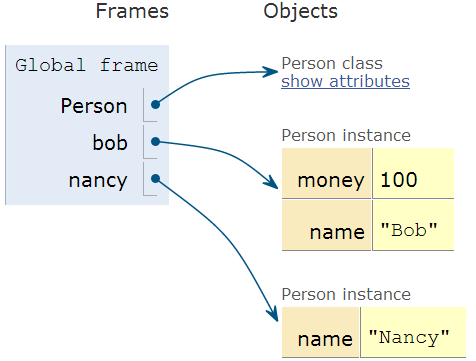
Two Persons
The code above has nothing new. But the code below does:
1 2 3 4 5 6 7 8 9 10 11 12 13 14 | class Person():
def __init__(self):
self.name = ""
self.money = 0
bob = Person()
bob.name = "Bob"
bob.money = 100
nancy = bob
nancy.name = "Nancy"
print(bob.name, "has", bob.money, "dollars.")
print(nancy.name, "has", nancy.money, "dollars.")
|
See the difference on line 10?
A common misconception when working with objects is to assume that the
variable bob is the Person object. This is not the case. The
variable bob is a reference to the Person object. That is, it
stores the memory address of where the object is, and not the object itself.
If bob actually was the object, then line 9 could create a copy of the
object and there would be two objects in existence. The output of the program
would show both Bob and Nancy having 100 dollars. But when run, the program
outputs the following instead:
Nancy has 100 dollars.
Nancy has 100 dollars.
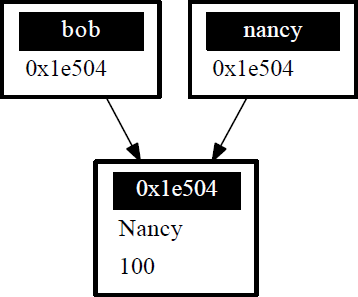
What bob stores is a reference to the object. Besides reference, one may
call this address, pointer, or handle. A reference is an address in
computer memory for where the object is stored. This address is a hexadecimal
number which, if printed out, might look something like 0x1e504. When line 9
is run, the address is copied rather than the entire object the address points
to. See the figure below.
Class References
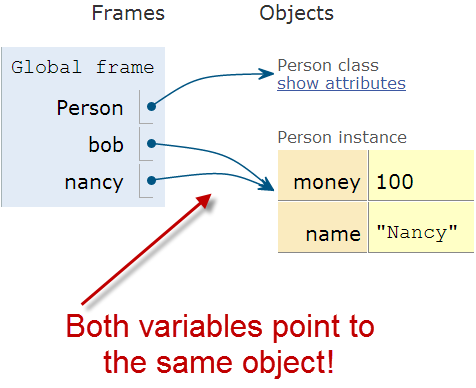
We can also run this in www.pythontutor.com to see how both of the variables are pointing to the same object.
One Person, Two Pointers
8.4.1 Functions and References
Look at the code example below. Line 1 creates a function that takes in a
number as a parameter. The variable money is a variable that contains a
copy of the data that was passed in. Adding 100 to that number does not change
the number that was stored in bob.money on line 11. Thus, the print
statement on line 14 prints out 100, and not 200.
1 2 3 4 5 6 7 8 9 10 11 12 13 14 | def give_money1(money):
money += 100
class Person():
def __init__(self):
self.name = ""
self.money = 0
bob = Person()
bob.name = "Bob"
bob.money = 100
give_money1(bob.money)
print(bob.money)
|
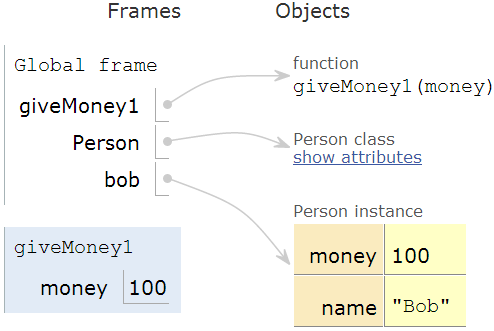
Running on PythonTutor we see that there are two instances of the
money variable. One is a copy and local to the give_money1 function.
Function References
Look at the additional code below. This code does cause bob.money to increase
and the print statement to print 200.
1 2 3 4 5 | def give_money2(person):
person.money += 100
give_money2(bob)
print(bob.money)
|
Why is this? Because person contains a copy of the memory address of the
object, not the actual object itself. One can think of it as a bank account
number. The function has a copy of the bank account number, not a copy of the
whole bank account. So using the copy of the bank account number to deposit
100 dollars causes Bob’s bank account balance to go up.

Function References
Arrays work the same way. A function that takes in an array (list) as a parameter and modifies values in that array will be modifying the same array that the calling code created. The address of the array is copied, not the entire array.
8.4.2 Review Questions
- Create a class called
Cat. Give it attributes for name, color, and weight. Give it a method calledmeow. - Create an instance of the cat class, set the attributes, and call the
meowmethod. - Create a class called
Monster. Give it an attribute for name and an integer attribute for health. Create a method calleddecrease_healththat takes in a parameter amount and decreases the health by that much. Inside that method, print that the animal died if health goes below zero.
8.5 Constructors
There’s a terrible problem with our class for Dog listed below. When we create a dog, by default the dog has no name. Dogs should have names! We should not allow dogs to be born and then never be given a name. Yet the code below allows this to happen, and that dog will never have a name.
1 2 3 4 5 | class Dog()
def __init__(self):
self.name = ""
my_dog = Dog()
|
Python doesn’t want this to happen. That’s why Python classes have a special function that is called any time an instance of that class is created. By adding a function called a constructor, a programmer can add code that is automatically run each time an instance of the class is created. See the example constructor code below:
1 2 3 4 5 6 7 8 | class Dog():
def __init__(self):
""" Constructor. Called when creating an object of this type. """
self.name = ""
print("A new dog is born!")
# This creates the dog
my_dog = Dog()
|
The constructor starts on line 2. It must be named __init__. There are
two underscores before the init, and two underscores after.
A common mistake is to only use one.
The constructor must take in self as the first parameter just like other methods in a class. When the program is run, it will print:
A new dog is born!
When a Dog object is created on line 8, the __init__ function is automatically called and the message is printed to the screen.
8.5.1 Avoid This Mistake
Put everything for a method into just one definition. Don’t define it twice. For example:
1 2 3 4 5 6 7 8 9 | # Wrong:
class Dog():
def __init__(self):
self.age = 0
self.name = ""
self.weight = 0
def __init__(self):
print("New dog!")
|
The computer will just ignore the first __init__ and go with the last
definition. Instead do this:
1 2 3 4 5 6 7 | # Correct:
class Dog():
def __init__(self):
self.age = 0
self.name = ""
self.weight = 0
print("New dog!")
|
A constructor can be used for initializing and setting data for the object. The example Dog class above still allows the name attribute to be left blank after the creation of the dog object. How do we keep this from happening? Many objects need to have values right when they are created. The constructor function can be used to make this happen. See the code below:
1 2 3 4 5 6 7 8 9 10 11 12 13 14 15 | class Dog():
def __init__(self, new_name):
""" Constructor. """
self.name = new_name
# This creates the dog
my_dog = Dog("Spot")
# Print the name to verify it was set
print(my_dog.name)
# This line will give an error because
# a name is not passed in.
her_dog = Dog()
|
On line 3 the constructor function now has an additional parameter named
new_name. The value of this parameter is used to set the name attribute
in the Dog class on line 8. It is no longer possible to create a
Dog class without a name. The code on line 15 tries this. It will cause a
Python error and it will not run. A common mistake is to name the parameter of
the __init__ function the same as the attribute and assume that the values
will automatically synchronize. This does not happen.
8.5.2 Review Questions
- Should class names begin with an upper or lower case letter?
- Should method names begin with an upper or lower case letter?
- Should attribute names begin with an upper or lower case letter?
- Which should be listed first in a class, attributes or methods?
- What are other names for a reference?
- What is another name for instance variable?
- What is the name for an instance of a class?
- Create a class called Star that will print out “A star is born!” every time it is created.
- Create a class called Monster with attributes for health and a name. Add a constructor to the class that sets the health and name of the object with data passed in as parameters.
8.6 Inheritance
Another powerful feature of using classes and objects is the ability to make use of inheritance. It is possible to create a class and inherit all of the attributes and methods of a parent class.
For example, a program may create a class called Boat which has all the
attributes needed to represent a boat in a game:
1 2 3 4 5 6 7 8 9 10 11 12 13 14 15 16 17 18 19 | class Boat():
def __init__(self):
self.tonnage = 0
self.name = ""
self.is_docked = True
def dock(self):
if self.is_docked:
print("You are already docked.")
else:
self.is_docked = True
print("Docking")
def undock(self):
if not self.is_docked:
print("You aren't docked.")
else:
self.is_docked = False
print("Undocking")
|
To test out our code:
1 2 3 4 5 6 7 | b = Boat()
b.dock()
b.undock()
b.undock()
b.dock()
b.dock()
|
The output:
You are already docked.
Undocking
You aren't docked.
Docking
You are already docked.
(If you watch the video for this section of the class, you’ll note that the “Boat” class in the video doesn’t actually run. The code above has been corrected but I haven’t fixed the video. Use this as a reminder, no matter how simple the code and how experienced the developer, test your code before you deliver it!)
Our program also needs a submarine. Our submarine can do everything a boat can,
plus we need a command for submerge. Without inheritance we have two options.
- One, add the
submerge()command to our boat. This isn’t a great idea because we don’t want to give the impression that our boats normally submerge. - Two, we could create a copy of the
Boatclass and call itSubmarine. In this class we’d add thesubmerge()command. This is easy at first, but things become harder if we change theBoatclass. A programmer would need to remember that we’d need to change not only theBoatclass, but also make the same changes to theSubmarineclass. Keeping this code synchronized is time consuming and error-prone.
Luckily, there is a better way. Our program can create child classes that will inherit all the attributes and methods of the parent class. The child classes may then add fields and methods that correspond to their needs. For example:
1 2 3 | class Submarine(Boat):
def submerge(self):
print("Submerge!")
|
Line 1 is the important part. Just by putting Boat in between the
parentheses during the class declaration, we have automatically picked up
every attribute and method that is in the Boat class. If we update Boat,
then the child class Submarine will automatically get these updates.
Inheritance is that easy!
The next code example is diagrammed out in the figure below.

Class Diagram
1 2 3 4 5 6 7 8 9 10 11 12 13 14 15 16 17 18 19 20 21 22 23 24 25 26 27 | class Person():
def __init__(self):
self.name = ""
class Employee(Person):
def __init__(self):
# Call the parent/super class constructor first
super().__init__()
# Now set up our variables
self.job_title = ""
class Customer(Person):
def __init__(self):
super().__init__()
self.email = ""
john_smith = Person()
john_smith.name = "John Smith"
jane_employee = Employee()
jane_employee.name = "Jane Employee"
jane_employee.job_title = "Web Developer"
bob_customer = Customer()
bob_customer.name = "Bob Customer"
bob_customer.email = "send_me@spam.com"
|
By placing Person between the parentheses on lines 5 and 13, the
programmer has told the computer that Person is a parent class to both
Employee and Customer. This allows the program to set the name
attribute on lines 19 and 22.
Methods are also inherited. Any method the parent has, the child class will have too. But what if we have a method in both the child and parent class?
We have two options. We can run them both with super() keyword. Using
super() followed by a dot operator, and then finally a method name
allows you to call the parent’s version of the method.
The code above shows the first option using super where we run not only the
child constructor but also the parent constructor.
If you are writing a method for a child and want to call a parent method, normally it will be the first statement in the child method. Notice how it is in the example above.
All constructors should call the parent constructor because then you’d have a child without a parent and that is just sad. In fact, some languages force this rule, but Python doesn’t.
The second option? Methods may be overridden by a child class to provide
different functionality. The example below shows both options. The
Employee.report overrides the Person.report because it never calls
and runs the parent report method. The Customer report does call the
parent and the report method in Customer adds to the Person
functionality.
1 2 3 4 5 6 7 8 9 10 11 12 13 14 15 16 17 18 19 20 21 22 23 24 25 26 27 28 29 30 31 32 33 34 35 36 37 38 39 40 41 42 43 44 45 | class Person():
def __init__(self):
self.name = ""
def report(self):
# Basic report
print("Report for", self.name)
class Employee(Person):
def __init__(self):
# Call the parent/super class constructor first
super().__init__()
# Now set up our variables
self.job_title = ""
def report(self):
# Here we override report and just do this:
print("Employee report for", self.name)
class Customer(Person):
def __init__(self):
super().__init__()
self.email = ""
def report(self):
# Run the parent report:
super().report()
# Now add our own stuff to the end so we do both
print("Customer e-mail:", self.email)
john_smith = Person()
john_smith.name = "John Smith"
jane_employee = Employee()
jane_employee.name = "Jane Employee"
jane_employee.job_title = "Web Developer"
bob_customer = Customer()
bob_customer.name = "Bob Customer"
bob_customer.email = "send_me@spam.com"
john_smith.report()
jane_employee.report()
bob_customer.report()
|
8.6.1 Is-A and Has-A Relationships
Classes have two main types of relationships. They are “is a” and “has a” relationships.
A parent class should always be a more general, abstract version of the
child class. This type of child to parent relationship is called an
is a relationship. For example, a parent class Animal could have a child
class Dog. The dog is an animal.
The Dog class could have a child class Poodle. The poodle is a dog, and
is an animal.
It does not work the other way! A dolphin is a mammal, but a
mammal is not always a dolphin. So the class Dolphin should never
be a parent to a class Mammal.
Unrelated items that do not pass the is a test should not form parent/child
relationships. For example, a class Table should not be a
parent to a class Chair because a chair is not a table.
The other type of relationship is the has a relationship. These relationships
are implemented in code by class attributes. A dog has a name, and so
the Dog class has an attribute for name. Likewise a person could have
a dog, and that would be implemented by having the Person class have
an attribute for Dog. The Person class would not derive from Dog
because that would be some kind of insult.
Looking at the prior code example we can see:
- Employee is a person.
- Customer is a person.
- Person has a name.
- Employee has a job title.
- Customer has an e-mail.
8.7 Static Variables vs. Instance Variables
The difference between static and instance variables is confusing. Thankfully it isn’t necessary to completely understand the difference right now. But if you stick with programming, it will be. Therefore we will briefly introduce it here.
There are also some oddities with Python that kept me confused the first several years I’ve made this book available. So you might see older videos and examples where I get it wrong.
An instance variable is the type of class variable we’ve used so far. Each instance of the class gets its own value. For example, in a room full of people each person will have their own age. Some of the ages may be the same, but we still need to track each age individually.
With instance variables, we can’t just say “age” with a room full of people. We need to specify whose age we are talking about. Also, if there are no people in the room, then referring to an age when there are no people to have an age makes no sense.
With static variables the value is the same for every single instance of the
class. Even if there are no instances, there still is a value for a static
variable. For example, we might have a count static variable for the number
of Human classes in existence. No humans? The value is zero, but the
count variable still exists.
In the example below, ClassA creates an instance variable. ClassB
creates a static variable.
1 2 3 4 5 6 7 8 9 10 11 12 13 14 15 16 17 18 19 20 21 22 23 | # Example of an instance variable
class ClassA():
def __init__(self):
self.y = 3
# Example of a static variable
class ClassB():
x = 7
# Create class instances
a = ClassA()
b = ClassB()
# Two ways to print the static variable.
# The second way is the proper way to do it.
print(b.x)
print(ClassB.x)
# One way to print an instance variable.
# The second generates an error, because we don't know what instance
# to reference.
print(a.y)
print(ClassA.y)
|
In the example above, lines 16 and 17 print out the static variable. Line 17 is the “proper” way to do so. Unlike before, we can refer to the class name when using static variables, rather than a variable that points to a particular instance. Because we are working with the class name, by looking at line 17 we instantly can tell we are working with a static variable. Line 16 could be either an instance or static variable. That confusion makes line 17 the better choice.
Line 22 prints out the instance variable, just like we’ve done in prior
examples. Line 23 will generate an error because each instance of y is
different (it is an instance variable after all) and we aren’t telling the
computer what instance of ClassA we are talking about.
8.7.1 Instance Variables Hiding Static Variables
This is one “feature” of Python I dislike. It is possible to have a static variable, and an instance variable with the same name. Look at the example below:
1 2 3 4 5 6 7 8 9 10 11 12 13 14 15 16 17 18 19 20 21 22 23 24 25 26 27 28 29 30 31 32 33 34 35 36 | # Class with a static variable
class ClassB():
x = 7
# Create a class instance
b = ClassB()
# This prints 7
print(b.x)
# This also prints 7
print(ClassB.x)
# Set x to a new value using the class name
ClassB.x = 8
# This also prints 8
print(b.x)
# This prints 8
print(ClassB.x)
# Set x to a new value using the instance.
# Wait! Actually, it doesn't set x to a new value!
# It creates a brand new variable, x. This x
# is an instance variable. The static variable is
# also called x. But they are two different
# variables. This is super-confusing and is bad
# practice.
b.x = 9
# This prints 9
print(b.x)
# This prints 8. NOT 9!!!
print(ClassB.x)
|
Allowing instance variables to hide static variable caused confusion for me for many years!